 Marco Sebastiano Alessi |
May 21, 2026
Marco Sebastiano Alessi |
May 21, 2026


Sidechain compression is a mixing technique that you often see mentioned online that everyone seems to use. It is one of those techniques that can fix audio issues but can also be used creatively to improve and enrich your sound.
For beginners, this concept can become increasingly confusing with each explanation, until you actually start using it in your mixes. That’s why today, we'll discuss what sidechain compression is, how to use it, and when to use it in your projects.
Let’s dive in!
What is Sidechain Compression?
Sidechain compression is an audio production technique in which the volume of one audio signal (the target track) is automatically reduced (compressed) by the activity of a second, separate audio signal (the trigger track). Frequently used for “ducking”, it is essential for creating space in a mix, such as lowering the bass volume when the kick drum hits, preventing frequency masking, or creating a rhythmic “pumping” effect.
To further explain sidechain compression, let’s review what regular compression is and how a compressor works in a mix.
Compression is an audio processing technique used to control volume and keep a signal within a specific dynamic range. To control this volume, we use a compressor, which is hardware and software with settings such as threshold, ratio, and attack and release controls to adjust the dynamics and compression level. When the compressor kicks in, it boosts quiet notes and softens loud ones so your instruments are heard within the desired dynamic range.
Unlike traditional compression, sidechain compression relies on an external signal to trigger the compressor, which is placed on a different audio track than the one you want to compress. In simpler words, you use sidechain compression to control the volume level of a track with another track. You place the compressor on one instrument, but instead of setting it to work within that instrument, you use other instruments.
Here is the general workflow for sidechain compression: 1) Identify the signal to be processed, 2) Choose a source for the sidechain input, 3) Set up routing so the compressor receives the sidechain signal, and 4) Adjust compression parameters to achieve the desired effect. In the next section, you’ll find a detailed tutorial using Samplitude.
How to Use Sidechain Compression
Most major digital audio workstations (DAWs) include a built-in sidechain compressor or support third-party VSTs. I’ll show you how to use sidechain compression in Boris FX Samplitude, a professional DAW with object-based editing and a hybrid audio engine, so you can make precise edits with the cleanest audio quality.

Samplitude features the coreFX, colorFX, essentialFX, and the Analogue Modeling Suite with many compression options for your mixing needs. It’s also packed with other mixing and mastering tools and VSTi instruments. In the suite version, premium filters such as CrumplePop, Melodyne, and Sound Forge are bundled, along with Dolby Atmos support.
To follow this tutorial, start by downloading a 15-day free trial of Samplitude.
Step 1: Install Samplitude
To install Samplitude, download and install the Boris FX Hub app first.
Launch the Hub app, then scroll through the product list to find Samplitude. Click and install it. Make sure you have an account, or create one, to activate the free trial.
Step 2: Start a New Project
Launch Samplitude and create a new project. You can start with a project template or begin empty, then import your recorded tracks for mixing.
Listen to your tracks and identify which ones you want for sidechain compression. For example, use it to tame a bass that competes with a kick drum in the low end, a vocal masked by guitars and synths, or a snare and cymbals clashing in the frequency spectrum.
Step 3: Add a Compressor
Select the track with the instrument you want to compress. Add a compressor plugin. In Samplitude, do this from the Track Editor or Track Header by clicking the black space and picking a plugin from the library. You have several compressor options in Samplitude: you can use the eFX Compressor from the essentialFX Suite, the coreFX Compressor from the coreFX Suite, or the AM Munition from the Analogue Modeling Suite.
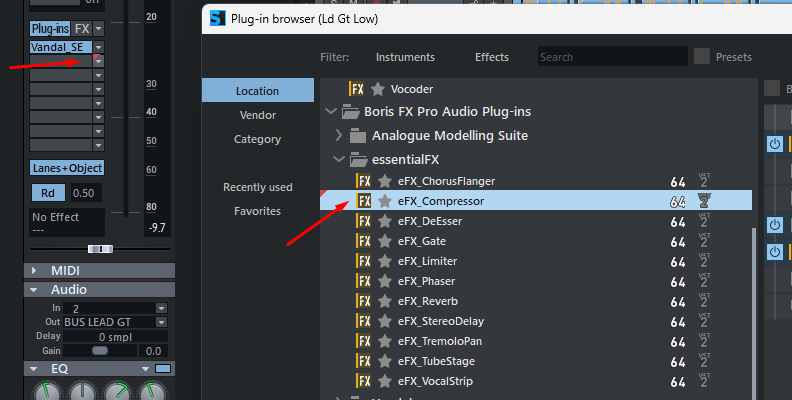
Step 4. Activate Sidechain Input
The eFX Compressor, coreFX Compressor, and AM Munition all have a Sidechain Input that lets you select one or more tracks in the project as a sidechain source.
In the plugin window, click on the top menu Sidechain Input to display several options.
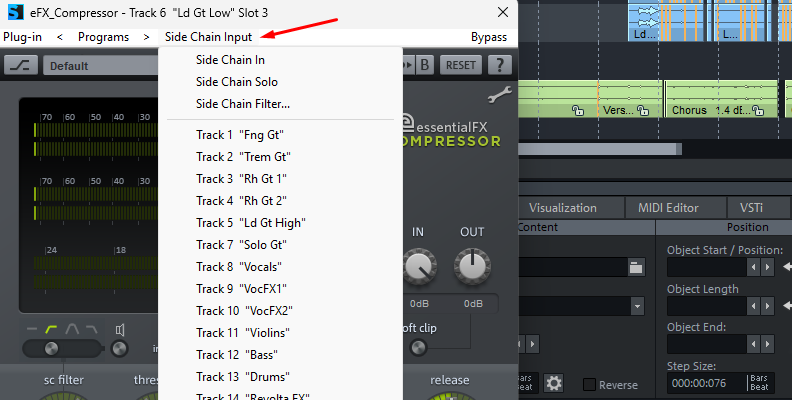
- Sidechain In activates and deactivates the sidechain function.
- Sidechain Solo lets you listen to the sidechain signal only, bypassing the plugin's effect.
- Sidechain Filter lets you filter the sidechain signal with a parametric EQ.
Below, you can choose which tracks are the sidechain sources. This signal tells the compressor when to engage. Selecting a source creates a sidechain bus in the corresponding track. This bus does not appear as a mixer channel like other tracks or buses. It only sends to the plugin's sidechain input.
Step 5: Compressor Settings
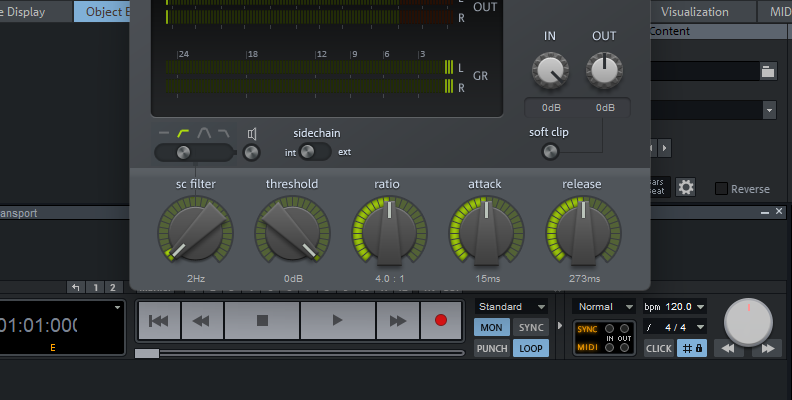
While the specific settings depend on the source material, here is a starting point for a clean ducking effect to create space in your mix.
Ratio: defines effect intensity. A high ratio reduces signal interference but leads to more aggressive pumping.
- Start with 2:1 for a subtle effect like ducking reverb.
- For a moderate, more general effect, set the ratio to 4:1 or 6:1. The effect is audible but not too aggressive.
- If you’re looking for a more aggressive EDM-pumping sound, set it to 8:1 or higher.
Threshold: the point at which the compressor engages. Lower the threshold until you see a gain reduction of about 3dB or 6dB. Adjust it until the meter shows significant gain reduction at the peak of the trigger sound.
Attack: controls the “punch”. A fast attack time catches the initial transients of the trigger signal and instantly ducks the target signal. Start with a value below 10ms and adjust as you require.
Release: controls how quickly the audio returns before the next trigger. A fast release, such as 20ms, delivers a rapid recovery and subtle ducking. A slower release makes the pumping effect more obvious.
Listen to your mix and adjust the attack and release times to experiment with different sounds.
Step 6: Volume Former Alternative
Samplitude has one last trick up its sleeve with the plugin coreFX Volume Former. A plugin dedicated to creating the pumping EDM-style ducking effect, simulating sidechain compression and gate effects without the complex routing.
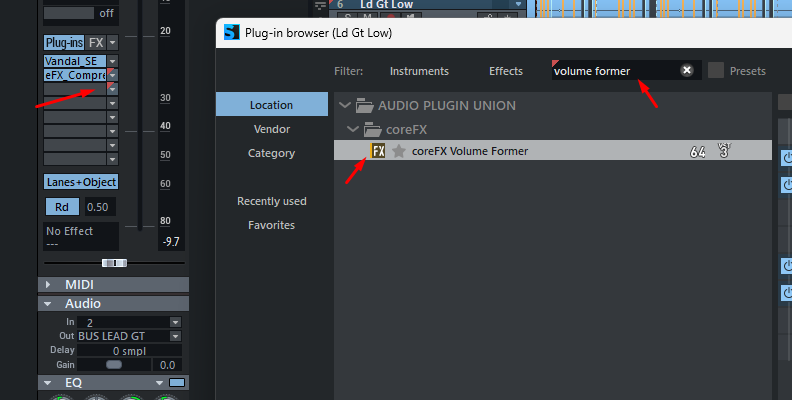
This plugin lets you use adjustable envelope shapes to sync the pump to the beat and build rhythmic pulsing sounds.
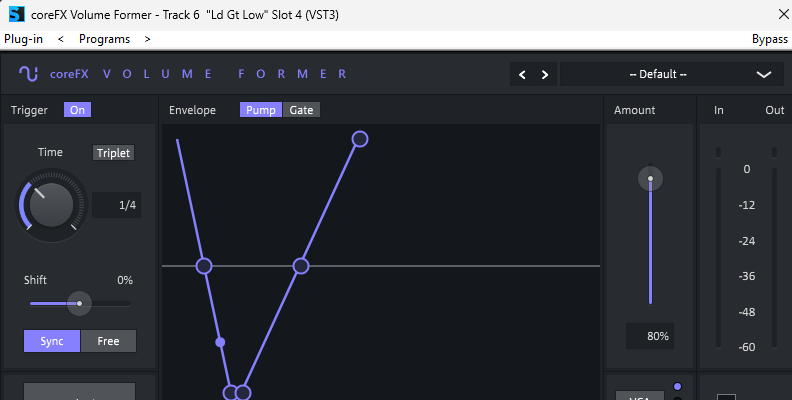
Here’s how you can use Volume Former to create a sidechain effect.
Select one of the two modes: Pump or Gate.
- Pump emulates sidechain compression by creating rhythmic dips in volume.
- Gate is used to create rhythmic gate effects.
You can freely adjust the envelope shape to determine how the volume changes. Press Sync to synchronize the modulation to the song's beat, or Free to manually adjust the frequency. Adjust the amount of the pumping effect applied with the Amount slider. Don’t forget to use the visualizer to see how the waveform is affected and make adjustments.
Experiment with this plugin, and if you find it is not for you, you can always create the effect via traditional sidechaining with the coreFX Compressor.
When to Use Sidechain Compression
Sidechain compression can be used in any genre because it helps maintain musical dynamics. It’s more widely used in genres such as Dance, EDM, and Pop music with 4/4 signatures to keep people on the dance floor. However, that does not mean it is the only way to use it. Here are some other examples of when to use sidechain compression.
EDM, Pop, and Dance Music
Use sidechain compression with these genres to create a dramatic, pumping effect that makes the music feel like it's breathing. It’s usually used on the bass track or synth pads. You can also use trigger signals that are muted in the mix. A good example is sidechaining a kick drum to trigger your synths, but with the Kick track muted so you can only hear the synth pads.
Frequency Separation
It helps achieve better separation and add more clarity to your mixes by making room in the frequency spectrum for competing instruments. Some examples are:
- Guitar to the rest of the mix during a guitar solo part to make it stand out.
- Sidechain kick and bass to avoid low-end muddiness.
- Snare and cymbals to allow the snare drum to cut through the mix.
- Kick drum signal and keys. Even if they’re not in the same frequency spectrum, they can enhance the keys' sound.
Podcasting
A popular use of sidechain compression åin podcasting is for ducking the music when the host is speaking. It can also help to reduce the volume of the other speakers in an interview.
Vocals
You can sidechain your lead vocal to make it sit above the rest of the mix. Keeping it front and center. Another trick with vocals is to sidechain reverb to them to achieve cleaner vocals.
Final Words
As a concept, sidechain compression is easy to grasp, but it’s within your DAW that the real challenge begins. The best way to understand and master sidechain compression is to get hands-on with your favorite plugin and DAW, experimenting with different settings and sounds.
If you want to try the compressor plugins in Samplitude or the Volume Former plugin, get your free trial today!
Good luck!